Introduction
I wanted to see how to route my network traffic over tor. Would it be too slow? Would it even work? TBH, the load times have been a bit worse, but yes - it works, and the load times aren’t even that bad.

The directory structure will end up looking like this:
├──tor-proxy
│  ├──compose.yaml
└──└──torrc
NOTE: I used Google’s Gemini, and a locally hosted gemma 4 model to build this. There are likely multiple resources that aren’t properly recorded.
Torrc
Setting up the torrc for what we want to do is critical, as are the permissions of this file.
torrc
# ==========================================
# 1. SOCKS PROXY CONFIGURATION
# ==========================================
# Listen on all internal Docker interfaces for SOCKS5 traffic
SocksPort 0.0.0.0:9050

# Firewall: Allow only your local network subnet (Adjust if your LAN uses 192.168.0.0/24)
SocksPolicy accept 10.133.7.0/24
SocksPolicy accept 127.0.0.1
SocksPolicy reject *

# ==========================================
# 2. NATIVE HTTP PROXY CONFIGURATION
# ==========================================
# Listen on all internal Docker interfaces for HTTP CONNECT traffic
HTTPTunnelPort 0.0.0.0:8118

# Note: HTTPTunnelPort inherently respects the SocksPolicy rules
# defined above, securing both ports simultaneously.

# ==========================================
# 3. LOGGING & SYSTEM DATA
# ==========================================
Log notice stdout
DataDirectory /var/lib/tor
CRITICAL Set permissions
chmod 644 torrc
compose.yaml
See:
services:
  tor-proxy:
    container_name: tor-proxy
    image: alpine:latest
    entrypoint: sh -c "apk add --no-cache tor && tor -f /etc/tor/torrc"
    ports:
      - "9050:9050"
      - "8118:8118"
    volumes:
      - ./torrc:/etc/tor/torrc:ro
    security_opt:
      - no-new-privileges:true
    cap_drop:
      - ALL
    cap_add:
      - NET_BIND_SERVICE
    restart: unless-stopped
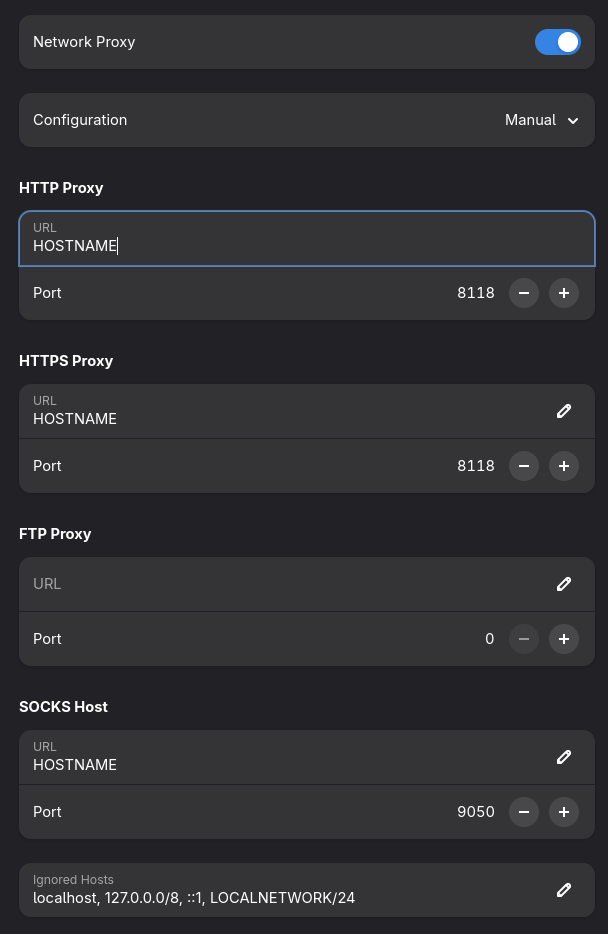
Linux Network Setup
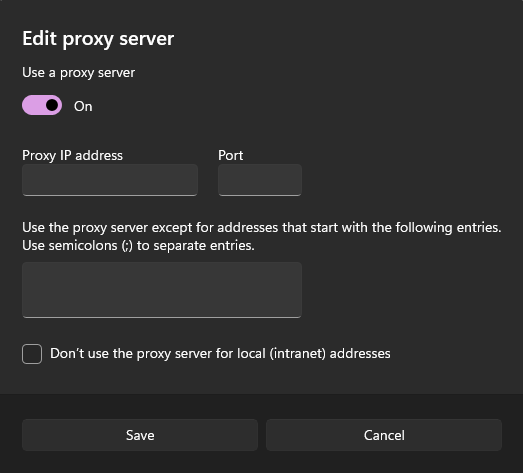
Windows Network Setup
Did it work?
Socks5
curl --socks5-hostname [Docker Host]:9050 https://check.torproject.org/api/ip
HTTP
curl --proxy http://mariner:8118 https://check.torproject.org/api/ip
One of many services to check your IP. In general, Google “what’s my ip”